Goreckiy Alexey
Master DonNTU

Faculty of computer science and technologies
Department of applied mathematics and information technology
Speciality "Software Engineering"

ESTIMATION OF QUALITY OF USER INTERFACE OF THE TEACHING PROGRAMS

Scientific adviser:Datsun Nataliya
Abstract
Introduction
Concept user interface
Modern methods and models used for developing user interface
UI models
Evaluation of the quality of interfaces
Method GOMS
References


Introduction


The effectiveness of the user with any application system is primarily determined by the quality of its interface. Since at present among the users is dominated by people who are not experts in computer technology and programming, there is a need to develop interfaces that take into account the peculiarities of the users of this level.


Designing the User Interface must be defined a number of requirements and the development of which the creators must adhere to certain standards.


There is a standard ISO/DIS 9241-14, which identifies seven essential requirements for the UI. Also, when designing and developing the user interface must take into account the nine principles of construction of the human-computer. Since such a system should strive for the most flexible combination of human and computer, the design interface, we need to give serious consideration to the issue of performance rights.


Among the main ways to increase performance rights allocated some extremely important, namely: reducing the number of input data, limiting the decision-making, reduction of subjective time perception, lack of pauses in the user's work and the constant display of system status (the presence of feedback).


When designing the user interface should focus on the initial phase of development - conceptual design. Formed in the initial phase of development concept in the future should be further elaborated on the basis of user tasks in a specific application system. Any developer must carry out checks on the user interface convenience.


as an objective criterion for assessing the interface can be considered an exact match of conduct applied system concepts the user to work with it.


Good user interfaces are crucial for the users. It does not matter how good this or that technology - if the developers failed to make the user interface as intuitive and attractive - it is unlikely to be successful. To a person interested in a new product, it must either be clearly understood its benefits, or be impressed them [23].


It is in this case become important creative (creative) ideas and unusual approach to interfaces.


The effective user interface software (tutorial system, software, website, CRM-system, mobile phone) can not be overestimated. User software is not so much worried about the perfection of the algorithms, according to which the program operates as ease of use. The end user interacts with the product is through its user interface, which is the connecting link between man and the software package [12].


User Interface is one of the most important competitive advantage of any software, so the organization and carrying out works on design and user interface design should be given maximum attention. Interface design is aimed at effective implementation of the tasks the user, therefore, to determine the amount of work necessary to formalize how the user will go to achieve a result, as well as conduct usability testing of actual or target users of the product, based not only on expert opinion, but also on issues identified in user experience [12].


Software must be adapted to the needs of users and the environment. In other developments may prove to be unsuccessful. The best interface allows the user to do what he wants when he wants and how he wants. The success of design is determined by how practical and comfortable to use interface.


complexity of designing and developing an interface is large enough. According to experts, on average, it accounts for over half the time of the project. Current is to reduce development costs and maintenance of software systems or development of effective software tools, where the effectiveness will ease the development, ease of maintenance and usability of the program [15].


Concept user interface


Interface - a set of technical, policy and guidance (protocols, rules, agreements) means for communicating in a computer system connected with the devices and programs, as well as from other devices and programs.

Interface - a way (standard), the interaction between objects. The interface defines the parameters, procedures, and characteristics of the interaction of objects.

    distinguish between the following interfaces [19]:
  • user interface - a set of methods of interaction between the computer program and the user of this program.
  • programming interface - a set of methods for interaction between programs.
  • physical interface - the way the interaction of physical devices.
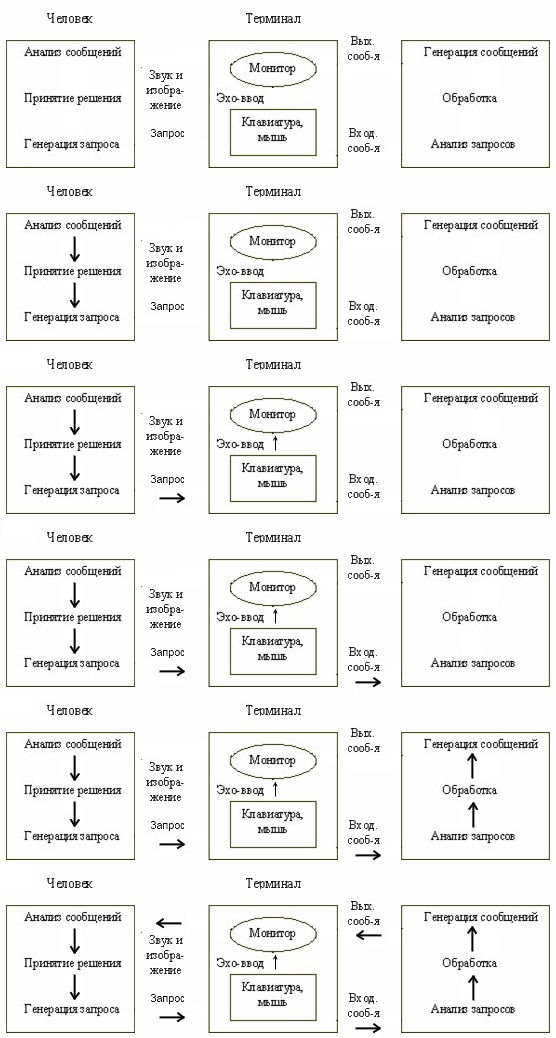
  • user interface - a set of software and hardware, providing the user's interaction with the computer. The basis of this interaction are the dialogues. The communication will be sending the message.

Figure 1 shows a diagram of user interaction with the computer.


Figure 1 - User interaction with the computer

    user interface includes a computer application [13]:
  • means of information display, displayed information, formats and codes.
  • command mode, the language of the user - interface ».
  • devices and technology input.
  • dialogue, interaction and transactions between the user and the computer user feedback.
  • decision support in a particular subject area.
  • how to use the software and documentation on it.

Modern methods and models used for developing user interface

Interface - a set of rules that can be combined in ways of human-computer interaction.

    modern types of interfaces are:
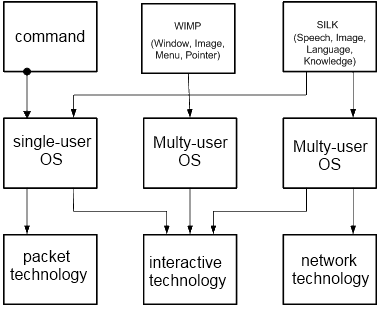
  1. command interface. The command interface is called so by the fact that in this kind of interface man at the command computer, the computer executes them and displays the result of man. The command interface is implemented as a packet-based technologies and the command line.
  2. WIMP - interface (Window - a window, Image - the image, Menu - Menu, Pointer - a pointer). A characteristic feature of this type of interface is that the dialogue with the user is not using the commands, and using graphic images - menus, windows and other elements. Although in this interface serves the team car, but it is done directly through the graphic images. This kind of interface is implemented at two levels of technology: a simple graphical interface and a clean »WIMP - interface.
  3. SILK - Interface (Speech - speech, Image - the image, Language - language, Knowlege - knowledge). This type of interface most closely approximates to the normal, human form of communication. As part of this interface is a normal "conversation" of man and computer. In this case, the computer finds a team for analyzing human speech and finding in it the key phrase. The result of the teams, it also converts human-friendly form. This type of interface most demanding of hardware resources, and so it is used mainly for military purposes.

Interaction listed interfaces with operating systems and technologies shown in Figure 2 [17].


Figure 2 - Interaction between user interfaces, their technology and operating systems

UI model

Procedure-oriented model

procedure-oriented interface uses the traditional model of user interaction based on the notion of "procedure " and "operation". In this model, the software allows the user to perform certain actions for which the user defines the mapping data and a consequence of the implementation of which is to obtain the desired result. [19]


    Properties of procedurally-oriented model:
  1. provide the user with the functions necessary to perform the tasks;
  2. emphasis is on task;
  3. icons represent applications, windows or operations;
  4. contents of folders and directories is reflected by a table-list.

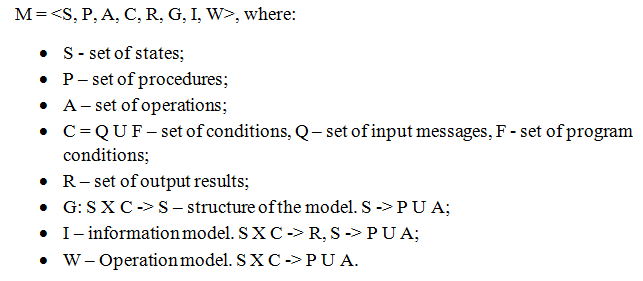
Figure 3 shows the structure of the model.


Figure 3 - The structure of the procedure-oriented model
Object-oriented model

object-oriented interface using a model of user interaction that focuses on manipulating objects domain. In this model, the user can interact directly with each object and initiate operations, during which interact with several objects. User task is formulated as a purposeful change of some object. The object is understood in the broadest sense - the model database, systems, etc. Object-oriented interface suggests that interaction with the user by means of selecting and moving icons corresponding to the object-oriented area. Distinguish Single Document (SDI) and MDI (MDI) interfaces. [19]


Shared Information Model

the information interaction play a major role tools for working with information - computers. Efficient use of the tool depends on the carrier-grade, skills and abilities. By controlling the technical system, a person becomes the operator [14].


However, if by virtue of its specific features, one can not directly communicate with the machine (at the level of electrical signals). Need to agree on their interpretations of the hardware. Necessary to use such devices, which would represent would be machine signals in a form suitable for human perception. At present, most often used visual (visual - light display on the screen), audio and tactile (haptic) display tools. On the instruments display a so-called dynamic information model (DIM) - an objective image of the real world, produced, respectively, of certain rules, set the machine signals that carry information to the operator.


shared information model is constantly changing in response to changes that occur in the observed object (the car). The operator takes the information contained in the dynamic model using the receptor [24].


This information then is processed by some method in the central nervous system. Based on the perception of dynamic information model in the subconscious of a person creates a view (concept) on the status of a real object, the machine. This model is called the conceptual or mental.


Figuratively, a conceptual model

Figuratively, a conceptual model - a set of representations of the operator of the real and projected state of the object and argoticheskoy system as a whole, the purposes and means of implementing its activities. Distinguish between fixed and variable (operational) components of imaginative conceptual model.


Constant include: an overview of the operator of time and space, on the strategic goals of activity, the values ??and assessments, the idea of ??the standard ways to respond to changing situations.


variable components are the result of analyzing the flow of information about argoticheskoy system, the transmitted information model.


significant influence on the figurative and the conceptual model has a unique sensory-perceptual experience of the operator, as well as the assimilation of a semiotic system, which is typical for this culture. Despite the structural complexity, figurative and conceptual model is a complete reflection of reality, have a tendency to improve. Development and improvement of image-concept model of the operator is one of the key problems of engineering psychology. [20]


Mental model

mental, or conceptual, model only internally mapping the user understands and interacts with the system. Mental model - a "map" of (mainly) physical system, or computer software, which carries the probable sequence of actions when the input and output operations.


mental model does not necessarily accurately reflects the situation and its components. While mental model helps people to predict what happens next, it will serve as a basis for understanding, analysis and decision making.


the basis of mental models - all the relationships between users and their computers, so it is the foundation for the development of principles and rules of the user interface.

Information and procedural model

role of the user interface is very important. Designing the interface should be based on knowledge, experience and expectations of the user. It's important to know the basic physical, educational opportunities, as well as the ability of users to perceive.


Cognitive psychology explains how our brain as we think we remember how we learn. This information and the procedural model of human cognition - a model that shows us the similarities of human cognition with computers and that a unified theory of computation can be used for research and design in psychology and computer industry.


Information and procedural model of human cognition - a model that shows us the similarities of human cognition with computers and that a unified theory of computation can be used for research and design in psychology and computer industry. Yet they are different models of perception and human cognition is much more complicated a simple process and store information.


Information and procedural model is trained as an evolving process, combining my skills, knowledge and acquired experience. Consequently, it is vital for designing software [22].


FE model represents learning as a developmental process, combining my skills, knowledge and acquired experience. Consequently, it is vital when designing software.


Evaluation of the quality of interfaces

user interface depends on the solved software problems, input and output data, but at the same time there is considerable freedom in the form in which all these data will be presented to the user. On how the user interface is functional, clear and easy to use end-user depends largely on the success of the solution set when designing software.


The process of designing the user interface Greatest influence subjective perceptions of the designer of clarity, comfort and beauty. Therefore, great importance is the problem of assessing the quality of the user interface. Conducting such assessments in the early stages of the design process can avoid a lot of mistakes, misjudgments, rejection of software by end users.


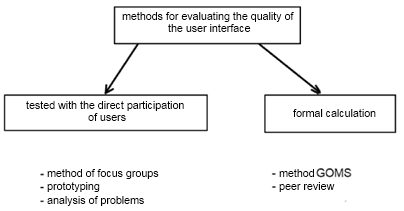
There are a number of approaches for assessing the quality of the user interface. In general, all methods can be divided into two groups: direct methods for testing the interface group of users and methods without such testing based on formal calculations. And those other methods are equally applicable both to assess the interface of traditional software and Web-based applications.


choice of methods depends largely on how feasible the direct testing of this or that stage of the project and allocated to such a testing time and budget. It is important to consider not only the cost of the design and development of high-quality and user-friendly interface, but also possible financial losses that are inevitable if the interface is not ready or inconvenient to use.


Although the assessment of the quality of the user interface process is quite subjective and difficult to formalize [3], we can say with confidence that a good interface should provide an effective and user productivity. There is also a set of criteria that should satisfy the quality interface [1, 5, 6, 8, 9]:


Typically, the interface is built to perform a specific task, and therefore can determine in advance the minimum amount of information that the user must enter in order to solve this problem. This amount of information is the property of the problem itself and does not depend on the choice of embodiment of the interface. From this perspective, a better one interface option, which does not require you to enter extra information, on the other side is clear and that if anything extra input is not required, to improve the interface to look the other way, rather than reduced input data [18].


are a number of the most common methods for assessing the quality of the user interface (Fig. 4):


Figure 4 - Methods for evaluating the interface
The method of focus groups

The method is based on a special form of an interview conducted in a group. A focus group is a group of people or professionals (usually 7-10 people) who are not familiar with the proposed them to evaluate the interface and, as a rule, are potential or interested users.


focus group might like to precede quantitative surveys and carried out after them.


In the first case, for testing and discussion of the proposed prototype interface to be assessed, with the primary task of the focus group - to gather initial views on the interface, check whether it meets expectations, find out what causes problems. Such a study can narrow down the problem and suggest hypotheses for further solutions.


In the second case, focus groups tend to focus on refinement of quantitative research, its complement by a more detailed elaboration of information already received. Testing and discussion is invited to a working version of the information system interface to be assessed. Such testing allows you to identify what was missing in the early stages of designing the user interface and receive suggestions on improving the interface.


focus group conducted at fixed scenario, this whole conversation should be recorded on video or audio media for further interpretation and analysis.


The method of focus groups can get enough in-depth information about the features of the behavior of end users, which is simply impossible to find other methods. This method allows you to better understand users' - identify their concerns and wishes.


usually analyzed by a number of small and independent focus groups (it is important that the groups differed in their composition, for example, it can be a team of experienced users (technicians), beginners and average users). This approach allows us to identify the most problematic areas in the interface and at the same time it allows you to evaluate in a very short period of time without resorting to large-scale testing.


It is understandable that in the first place to solve problems of medium users (because of their absolute majority).


useful to make some reassessments interface (iterations) with the same focus group after making changes.


disadvantage is that users rarely notice of successful interface solutions, as such, are perceived as natural and not attract attention, so it is important to be wary of big changes in those parts of the interface for which there were no comments from users.


Prototyping

Prototyping [2] is to create a wide range of models (prototypes) of the future user interface, which are subjected to comparative analysis. As a rule, the prototype contains an implementation of only the interface itself, without its functional content.


purpose of prototyping is to determine how this or that decision prospectively, and follow-up of the best. This approach saves time and resources spent on design and development.


most appropriate to apply this approach in the early stages of design that helps you select the correct direction of development, but it is possible and create a "local" prototype for the individual user interface elements. Thus, this approach encompasses both the design interface as a whole, and the design of its parts.


for prototyping attract not only professionals but also end users, while useful, any opinions, suggestions and graphic sketches, the main task - to create 5.7 interface options solves one problem and tighter.


prototypes are subjected to comparative analysis, in connection with what is necessary to define evaluation criteria. The starting point in defining such criteria is an issue for which solutions have been created prototypes. It may be time for user input, while the adoption of user decisions based on information provided, the subjective assessment of interface quality on some scale, etc. Typically, the most effective benchmarking of prototypes for several methods: GOMS, focus groups, expert assessment.


Analysis of problems

This analysis consists of two aspects - to identify what specific tasks a user attempts to perform by using the proposed interface, as well as in identifying how effectively the user is set before him the head of testing problem [18].


To test the need to have several people representing the estimated range of future system users who are unfamiliar with the interface. Studies show that there is no need to test with more users, the optimal number of subjects is 7.12. With such a small number of users can be found about 80% of the errors and omissions in the interface (an unfortunate location of interface elements, confusing menu, strange inscriptions, etc.) and get a reliable result in this case.


Testing begins with a preliminary survey of users whose purpose - to reveal how users are familiar with certain aspects of the subject area, typical tasks, if they have any experience with this software.


Users are encouraged to perform a simple task in accordance with the prepared script (which contains the necessary input data and the actions needed for its implementation). If users are familiar with the subject area, they are requested to independently perform a task which, in their opinion, should decide the application. In the process, measured by elapsed time, user, number of calls for help, user error, user questions and comments.


A user surveys to identify the degree of user satisfaction: how well an application performs tasks given if all the necessary information, and an extra hidden, etc.


Next in the received data is work to improve the interface.


Method GOMS

GOMS (short for Goals, Operators, Methods, and Selection Rules - Goals, Operators, Methods and selection rules), this family of methods allowing to simulate execution of a task by the user and based on this model to evaluate the quality of the interface (or, more precisely estimate task time as the main criterion of quality) [9]. This method was proposed by S. K. Card, T. P. Moran and A. Newell in 1983.


idea of ??the method lies in the fact that all user actions can be represented as a set of standard components of components (for example, pressing a particular button on the keyboard, move the mouse, etc.). For these types of components can be time measurement of their performance (on a large number of users) and to obtain statistical estimates of the execution time of an elementary action. Assessment of quality of the interface is an expansion of the task to model components, and the computation time, which is the average spent by the user to perform this task.


In this method, each objective or goal (Goal), which wants to reach the user using an interface consists of a set of methods (Methods) which in turn are built from operators (Operators). If the goal can be achieved in several ways, the choice by the rule selection (Selection Rules).


This method, like any other, has its advantages and disadvantages.


Expert evaluation

in the design and interface development already attained a large number of heuristic rules, guidelines and procedures [1, 5, 6, 8], we can follow to create high-quality (but relatively typical) interface.


method of expert evaluation of the quality of the interface is to investigate how the analyzed interface corresponds to the known rules, guidelines and procedures. This assessment identifies inconsistencies and contradictions, which must be eliminated.


Before the evaluation expert is a list of rules in order of importance, which must be met. The list includes both the recommendations of the supplier of OS and tools, as well as tried and tested in the domain model solutions. In evaluating the test as an interface corresponding to the list of requirements.


This method relies heavily on the experience, competence and professionalism of the experts conducting the analysis.


expert assessment methodology defined in [ÃÎÑÒ 28195-89] and [ÃÎÑÒ Ð ÈÑÎ/ÌÝÊ 9126-93]. Thus, these standards define the performance of software quality and methods of their evaluation, these indicators allow us to estimate the quality of software in general, including ease of use.


So, [ÃÎÑÒ Ð ÈÑÎ/ÌÝÊ 9126-93] introduces the concept of practical software - a set of attributes pertaining to the scope of work, required for individual assessment of such use or alleged certain range of users.


Evaluation of performance information interface - a criterion for the effectiveness of Ruskin

Rules GOMS can determine the time it takes the user to perform any clearly articulated purpose for which this interface is provided. However, this method is insufficient to assess how quickly the interface should work - his performance. We use the criterion of efficiency Ruskin, who evaluates performance information interface [7].


Information

performance interface E is defined as the ratio of the minimum amount of information required to complete a task, to the amount of information that the user must enter. Parameter E varies in [0, 1]. The parameter E is taken into account only the information needed for the task, and the information entered by the user. Several methods of action may have the same performance of E, but have a different time. It is possible that one method has a higher E, but it works slower than other methods.


Information measured in bits. One bit represents one of the two alternatives (0 or 1, "yes" or "no") and is a unit of information. When the number of n equally likely options the total number of transmitted information is defined as .


amount of information for each variant is defined as


If the probabilities for each alternative are not equal, and the i-th alternative has a probability p (i), then the information transmitted by this alternative, defined as


total amount of information is the sum of all variants of the expressions (2.1) or (2.2).


When using the mouse as an input device, the amount of information evaluated in the same way. If the screen is divided into two equal areas (one corresponds to the "yes ", while the second corresponds to the "no"), then click in one of these areas will transmit 1 bit of information. If there are n equally probable sites, then click on one of them reportedly bit of information. If the objects have different probabilities, using the sum of the amount of information obtained by the formula (2.2).


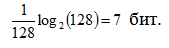
When sending information by pressing the keyboard its amount depends on the total number of keys and the relative frequency of use of each. That is, the keystrokes can be used as a rough measure of the information. If your keyboard has 128 keys, and each of them uses the same frequency, then press any of them will pass


In fact, the frequency of key changes significantly. For example, in the Russian keyboard layout on the key (in some studies - a key e) is used most often. Layouts for the French, German, English, Spanish, Italian is most common key e, then t or a (depending on language).


References

  1. Aqua Human Interface Guidelines - Apple Computer Corporation, 2002.

  2. Berkun S. The Human Factor: The Art of UI Prototyping - Microsoft Corporation, 2000.

  3. Cooper A. About Face 2.0: The Essentials of Interaction Design / Alan Cooper, Robert Reimann. - Wiley Publishing Inc., 2003 - 540 pages

  4. Kieras D. A Guide to GOMS Model Usability Evaluation using GOMSL and GLEAN3 - University of Michigan (ftp.eecs.umich.edu / people / kieras), 2002.

  5. Macintosh Human Interface Guidelines - Apple Computer Corporation, 2002.

  6. Official Guidelines for User Interface Developers and Designers - Microsoft Corporation, 2003.

  7. Raskin J. The Humane Interface: New Directions for Designing Interactive Systems, 2000, - 233p.

  8. User Interface Architecture Second Edition - IBM Corporation, 2001.

  9. Golovach VV five rules of good interface - Moscow: Open Systems, Pablish ¹ 6, 2000.

  10. GOST 28195-89 , EVALUATION OF QUALITY OF SOFTWARE.

  11. ISO / IEC 9126-93 , EVALUATION SOFTWARE.

  12. Ildar Valeev: Designing User Interfaces, 2008 / / URL http://valeev.org.ru/texts/3. htm

  13. Wikipedia. User interface / / URL http://ru.wikipedia.org/wiki/Èíòåðôåéñ_ïîëüçîâàòåëÿ

  14. Information technology: the phase of information processing / / URL http://vladimir.socio.msu.ru/ 1_KM/theme_08.htm

  15. Kleshchev AS Methods and tools for user interface design: the current state / Gribov V. / / Journal Software and Systems, 2001. / / URL http://www.swsys.ru/index.php?page=article&id=765

  16. Computer Science in Mechanical Engineering / / URL http://www.arctic-cooler.com/programming / 2/comptechnology80.htm

  17. Lectures on the user interface / / URL http://www.studfiles.ru/dir / cat32/subj1173/file9485/view99700.htm

  18. Ponomarev, IA Methods of assessing the quality of the user interface / / URL http://www.philippovich.ru/Library/Books/ITS/wwwbook/ist6/ponomarev2/ponomarev2.htm

  19. Programming, computers and cybernetics: User Interface / / URL http:/ / free-works.ru/raboty/programmirovanie_-kompyutery-i-kibernetika/polzovatelskij-interfejs/7772 /

  20. Psychological Dictionary / / URL http://psychology.net.ru/dictionaries/psy.htm? word = 576

  21. Snezhko EA Lecture number 1.Introduction to predmet.Osnovnye concepts / / URL http://sea1608.narod.ru/LK1. htm

  22. Snezhko EA LECTURE ¹ 2. Psychology of HCI / / URL http://sea1608.narod.ru/LK2.htm

  23. Futuristic User Interfaces, 2008 / / URL http://tods-blog.com.ua/ technologies / futuristic-user-interfaces /

  24. Human-Computer Interaction / / URL http://elemanrf.ru/UCH/


Important Note

When writing this abstract the master work is not completed yet. Final completion: December 2011. Full text of the work and materials on the subject can be obtained from the author or his manager after that date.

© Goreckiy Alexey, DonNTU, 2011