
Methods of monitoring and diagnostics of disk memory
Klimenko I.S., Cherednikova O.Yu., Kushnirenko Ye.N.
Донецкий национальный технический университет
Abstract: The paper focuses on the urgent issue of disk memory diagnostics, which is crucial for ensuring the integrity of data and stable operation of computer systems. It discusses existing methods for diagnosing HDD and SSD drives and analyzes the features, advantages, and disadvantages of popular software solutions designed for this purpose.
Keywords: disk, memory, application, diagnostics, monitoring, Windows, Linux.
A disk drive is an essential component of a computer, as it stores user files and operating system objects necessary for the proper functioning of the system. However, over time, drives may experience various malfunctions that can lead to reduced productivity, unstable system work, data loss, or even complete device failure. Timely detection of these issues can help prevent serious consequences and loss of important data. To help with early detection and prevention, there are several applications available that monitor the health and performance of disk drives. These tools can alert users to potential problems before they become serious, allowing them to take action to prevent further damage.
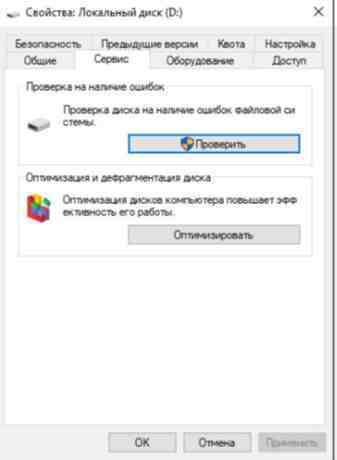
The easiest way to check the health of a disk in Windows is through the built-in disk diagnostic tool. This tool can be accessed by right-clicking on the local disk and selecting "Properties" from the context menu. The interface for this tool is shown in Figure 1. This utility performs a basic check for errors in the file system and can automatically correct some common issues, such as corrupted files or problems with the file allocation table (FAT). This is an effective way to solve simple problems.
Advantages of the application:
- it is built into the operating system by default, eliminating the need for additional software installation;
- the interface has no frills, which can be convenient for the average user.
Disadvantages of the application:
- provides limited information about the disk;
- it is suitable only for basic testing and does not allow for in-depth diagnostics.
Let's look at these utilities in more detail.
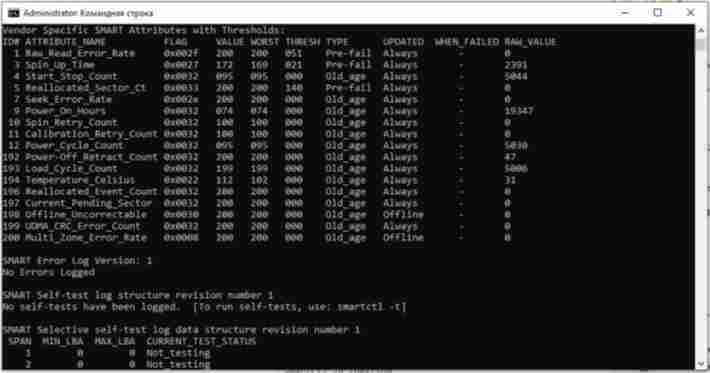
Smartmontools is a fairly powerful cross-platform application for advanced users that provides disk memory monitoring capabilities using self-monitoring technology [4]. The application is launched via the command line, as shown in Figure.2.
Advantages of the application:
- works on Linux, Windows and macOS operating systems;
- allows to perform a depth analysis of the disk;
- distributed for free.
Disadvantages of the application:
- there is no graphical interface;
- it can be difficult for novice users.
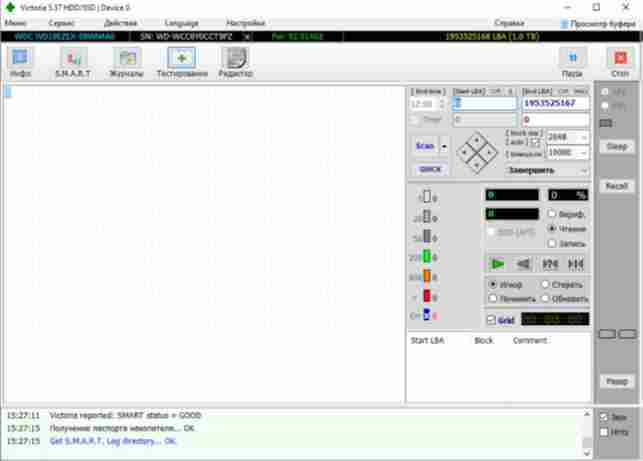
Victoria HDD/SSD is a program for diagnostics, research, testing and minor repairs of hard drives, SSD drives, memory cards, as well as any other drives in the Windows operating system [1]. The interface is shown in Figure 3.
Advantages of the application:
- provides an opportunity to analyze a disk in a variety of areas;
- distributed for free.
Disadvantages of the application:
- A large number of functions can make it difficult for an inexperienced user to perform the simplest analysis, which increases the risk of accidental disk damage;
- works on Windows family systems only.
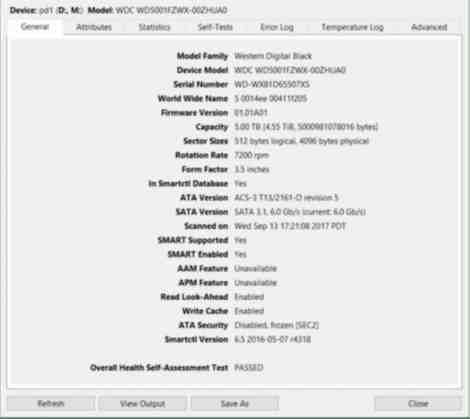
GSmartControl is a cross-platform application that is actually the interface of the smartctl utility included in the smartmontools package on Linux, which is used for monitoring, diagnostics and various tests of computer disks [2, 3]. The interface is shown in Figure 4.
Advantages of the application:
- simple interface;
- it runs on Linux, Windows, and macOS operating systems;
- suitable for inexperienced users;
- distributed for free.
Disadvantages of the application:
- exported reports contain redundant information, which can make it difficult to find the necessary data.
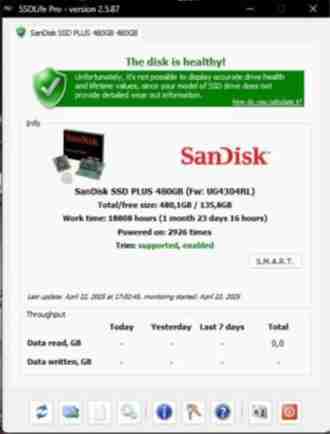
SSD Life is an application that helps users to monitor the condition of their SSD drives, in particular, the degree of their wear. It also provides detailed technical information about the disk, that can be useful for specialists in conducting indepth diagnostics [5]. The interface is shown in Figure 5.
Advantages of the application:
- simple interface;
- allows you to predict the remaining service life of the drive;
- supports most SSD models.
Disadvantages of the application:
- the free version has reduced functionality;
- does not work for hard drives;
- works only on Windows family systems.
Obviously, the security of data stored on disks is essential for users at all levels. Hardware failures, such as hard disk malfunctions or problems with solid-state memory cells, can lead to the loss of valuable information and system instability. This article will discuss several popular disk memory diagnostic applications, each with its own strengths and weaknesses.
The built-in Windows utility is simple, but its functionality is limited. Victoria HDD/SSD offers extensive features, but it can be difficult to use. Smartmontools has a multifunctional and cross-platform approach, but it may be inconvenient. GSmartControl also has cross-platform capabilities, but it produces redundant information. SSD Life is suitable for all users, although it requires payment and is not compatible with hard drives. In the future, we plan to develop a universal application that combines ease of use with advanced functionality tailored to different user categories.
References
- Программа «Victoria» [Электронный ресурс] / Профессионально восстановление информации – Режим доступа: https://hdd.by/victoria/
- GSmartControl [Электронный ресурс] - Режим доступа: https://gsmartcontrol.shaduri.dev/downloads
- GSmartControl – Здоровье жесткого диска [Электронный ресурс] / Пингвинус – Режим доступа: https://pingvinus.ru/program/gsmartcontrol
- Smartmontools [Электронный ресурс] - Режим доступа: https://www.smartmontools.org/
- SSDlife – мониторинг и диагностика SSD накопителей [Электронный ресурс] - Режим доступа: https://ssd-life.ru/